XRayXL
A flight recorder for the code running inside Excel.
When a spreadsheet is slow, freezes, or crashes, XRayXL tells you which XLL add-in and VBA functions actually ran — in what order, on which thread, triggered by which cell or button, with what arguments, returning what, how long each took, which functions threw errors and which handled them. It is a window into internals Excel has never opened, and it takes the guesswork out of diagnosing spreadsheet speed and stability problems.
XRayXL changes nothing about your workbook: no cells touched, no macros added, no VBA source read. You arm it, recalculate or run your macros, then read the trace file to see what really happened.
Warning. XRayXL hooks into the internals of the Excel process — undocumented details Microsoft can change in any update. It does its best to adapt to different versions of Excel, but it is not fool-proof. Read Before you run it, especially if the machine is managed by someone else.
How it works
Two tracers, one output.
- XLL functions. Excel's registration table names every registered add-in function and its address — a documented API — so XRayXL wraps each one with an inline detour that records the entry, calls the original, and records the exit. Functions registered after arming are picked up by watching Excel's registration callback. Nothing is derived; nothing is guessed.
- VBA procedures. The VBA interpreter reaches every opcode handler through
one table of function pointers inside
VBE7.DLL. XRayXL finds that table by its shape — not by a byte signature — and swaps a handful of entries for its own, so it sees each procedure start and stop without touching a byte of code. A per-thread shadow stack supplies depth and nesting; the calling cell comes from asking Excel.
What it does not trace. Excel's own built-in functions — SUM, XLOOKUP
and the rest — are deliberately out: XRayXL follows add-in and VBA code, not
the calculation engine's internals. COM and RTD add-ins are not traced either,
nor are JavaScript custom functions from Office Add-ins, which run in their own
runtime rather than as XLL exports or VBA p-code.
Everything else a calculation runs through is: XLL functions from any add-in,
VBA procedures, nested and recursive calls, and VBA outside the calculation
engine entirely — macros, buttons and event handlers — because the interpreter
hook is global.
Example trace file
Here is a real trace of one recalculation, with VBA functions and an add-in's XLL
function called from four cells, in the order Excel calculated them:
A3 calls VbaOuter, A4 calls TxE, A2 calls VbaPlain, A1 calls TxE.
VbaOuter also calls the XLL function itself, through Application.Run.
seq  input  kind   source  span  parent  depth  thread  qpc            module                        function  proc           typetext  caller  callerref                         argcount  args         ret  rettype  outcome   ticks  tracerticks  trust
1    1      entry  VBA     1     0       1      35720   8328812397734  [OneTimeline_8276.xlsm]Probe  VbaOuter  0x1B043D88988  Double    cell    [OneTimeline_8276.xlsm]Sheet1!A3  1         a1:Double=3
2    2      entry  XLL     2     0       1      35720   8328812401312  TracedAddin64.xll             TxE       TxE            E         cell    [OneTimeline_8276.xlsm]Sheet1!A3  1         a1:E=3
3    3      exit   XLL     2     0       1      35720   8328812401584  TracedAddin64.xll             TxE       TxE                                                                                       3    Q        returned  272    267          exit
4    4      exit   VBA     1     0       1      35720   8328812401830  [OneTimeline_8276.xlsm]Probe  VbaOuter  0x1B043D88988                                                                             4    Double   returned  4096   1151         exit
5    5      entry  XLL     3     0       1      35720   8328812402445  TracedAddin64.xll             TxE       TxE            E         cell    [OneTimeline_8276.xlsm]Sheet1!A4  1         a1:E=4.5
6    6      exit   XLL     3     0       1      35720   8328812402661  TracedAddin64.xll             TxE       TxE                                                                                       4.5  Q        returned  216    213          exit
7    7      entry  VBA     4     0       1      35720   8328812403216  [OneTimeline_8276.xlsm]Probe  VbaPlain  0x1B043D4F208  Double    cell    [OneTimeline_8276.xlsm]Sheet1!A2  1         a1:Double=2
8    8      exit   VBA     4     0       1      35720   8328812403626  [OneTimeline_8276.xlsm]Probe  VbaPlain  0x1B043D4F208                                                                             6    Double   returned  410    399          exit
9    9      entry  XLL     5     0       1      35720   8328812403977  TracedAddin64.xll             TxE       TxE            E         cell    [OneTimeline_8276.xlsm]Sheet1!A1  1         a1:E=1.5
10   10     exit   XLL     5     0       1      35720   8328812404144  TracedAddin64.xll             TxE       TxE                                                                                       1.5  Q        returned  167    165          exit
Show the raw file
seq,input,kind,source,span,parent,depth,thread,qpc,module,function,proc,typetext,caller,callerref,argcount,args,ret,rettype,outcome,ticks,tracerticks,trust
1,1,entry,VBA,1,0,1,35720,8328812397734,[OneTimeline_8276.xlsm]Probe,VbaOuter,0x1B043D88988,Double,cell,[OneTimeline_8276.xlsm]Sheet1!A3,1,a1:Double=3,,,,,,
2,2,entry,XLL,2,0,1,35720,8328812401312,TracedAddin64.xll,TxE,TxE,E,cell,[OneTimeline_8276.xlsm]Sheet1!A3,1,a1:E=3,,,,,,
3,3,exit,XLL,2,0,1,35720,8328812401584,TracedAddin64.xll,TxE,TxE,,,,,,3,Q,returned,272,267,exit
4,4,exit,VBA,1,0,1,35720,8328812401830,[OneTimeline_8276.xlsm]Probe,VbaOuter,0x1B043D88988,,,,,,4,Double,returned,4096,1151,exit
5,5,entry,XLL,3,0,1,35720,8328812402445,TracedAddin64.xll,TxE,TxE,E,cell,[OneTimeline_8276.xlsm]Sheet1!A4,1,a1:E=4.5,,,,,,
6,6,exit,XLL,3,0,1,35720,8328812402661,TracedAddin64.xll,TxE,TxE,,,,,,4.5,Q,returned,216,213,exit
7,7,entry,VBA,4,0,1,35720,8328812403216,[OneTimeline_8276.xlsm]Probe,VbaPlain,0x1B043D4F208,Double,cell,[OneTimeline_8276.xlsm]Sheet1!A2,1,a1:Double=2,,,,,,
8,8,exit,VBA,4,0,1,35720,8328812403626,[OneTimeline_8276.xlsm]Probe,VbaPlain,0x1B043D4F208,,,,,,6,Double,returned,410,399,exit
9,9,entry,XLL,5,0,1,35720,8328812403977,TracedAddin64.xll,TxE,TxE,E,cell,[OneTimeline_8276.xlsm]Sheet1!A1,1,a1:E=1.5,,,,,,
10,10,exit,XLL,5,0,1,35720,8328812404144,TracedAddin64.xll,TxE,TxE,,,,,,1.5,Q,returned,167,165,exit
Read row 1 as: the VBA function VbaOuter, in module Probe of OneTimeline_8276.xlsm,
called from [OneTimeline_8276.xlsm]Sheet1!A3, declared Double, given
3. The caller column says what kind of thing called it and
callerref describes which one — the same address Excel's own
Range.Address(,,,True) gives, so you can paste it straight back into a formula.
Rows 2 and 3 are the add-in call VbaOuter made: TxE, exported by
TracedAddin64.xll, registered with argument code E, given 3,
returned 3 in 272 ticks. It still names A3 as its caller, because
Excel reports the cell that started the chain. Each source counts its own
depth, so the add-in call reads depth 1 and parent 0; its place inside
VbaOuter shows in the order of the rows, between that function's entry and exit.
Row 4 closes VbaOuter: returned 4, a Double, after 4096 ticks, 1151 of them the
tracer's own (tracerticks), so the function itself took 2945.
The other rows are the same shapes on their own: VbaPlain from A2
returning 6, and TxE called directly from A4 and A1.
Errors say where they were thrown, and who caught them
VBA entry  E_Outer               depth=1 parent=0
VBA entry  E_Middle              depth=2 parent=1
VBA entry  E_Thrower             depth=3 parent=2
VBA exit   E_Thrower   threw     depth=3 parent=2  ticks=4657   trust=exit
VBA exit   E_Middle    unwound   depth=2 parent=1  ticks=6585   trust=exit
VBA exit   E_Outer     handled   depth=1 parent=0  ticks=10111  trust=exit
Every exit row carries an outcome (always returned for an XLL), and a VBA
chain reads outwards from the throw. threw is the procedure that raised. unwound is one the error passed
through — it ran nothing after the raise, so it did not handle it. handled
is the one that caught it. Everything else reads returned.
Not supported: asynchronous XLL functions (registered with a leading >
or an X handle argument) are marked in the trace but carry no duration — they
return before their answer exists, so there is nothing to measure. Real-time
data (=RTD(...)) is a COM mechanism rather than the XLL C API, and is not
traced at all.
See it on a timeline
After Disarm, the Perfetto button opens the trace in
Perfetto UI, an open-source trace viewer, in your
browser. Each thread is a track, each call a slice nested under the call that
made it, and Excel's events are markers. Click a slice for its arguments, its
result, how long it took and how much of that was XRayXL's own. The trace is
converted on your machine by XRayXL-Perfetto.html, which sits beside the
add-in, and nothing is uploaded. Perfetto asks whether to trust "An unknown
origin": that is the page, so answer Yes. The same page takes any trace file,
CSV or JSON Lines: open it, and press Input XRayXL Trace or drop the file on it.
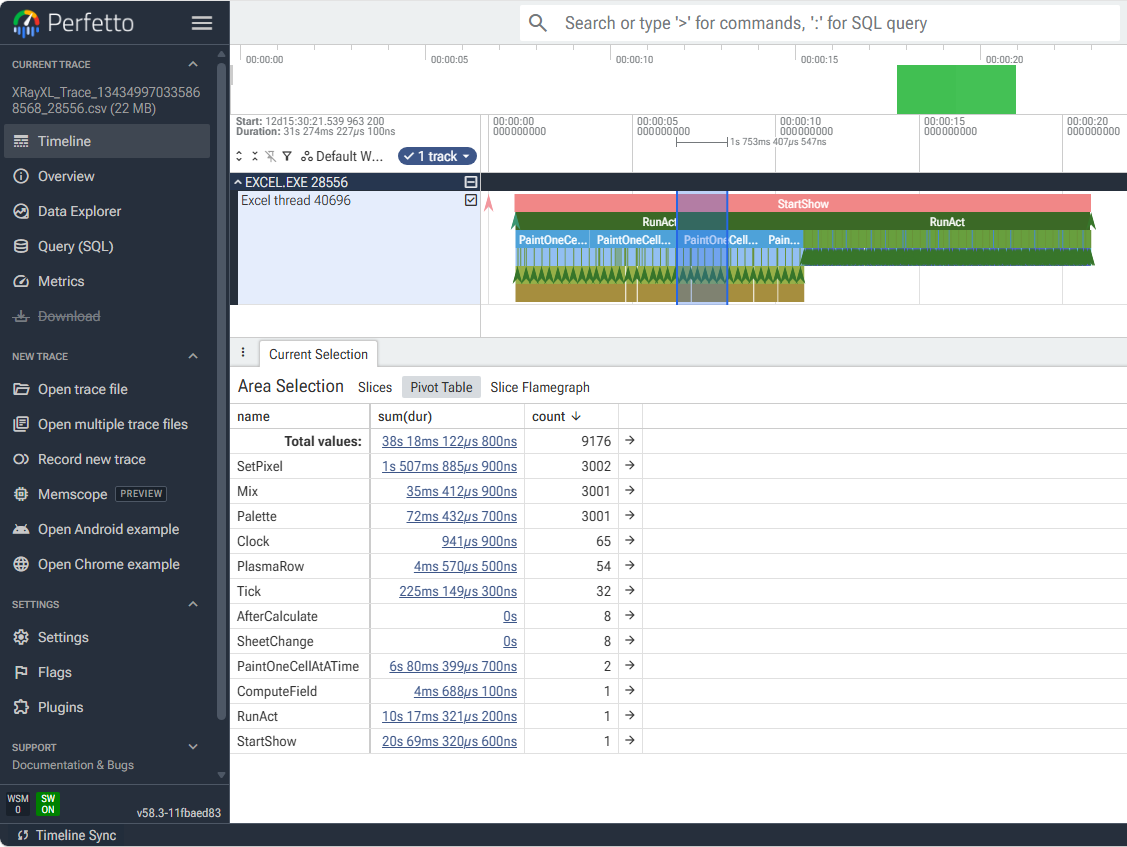
Details of the Trace File in docs/TraceRowModel.md.
Getting started
No build required. Download XRayXL-<version>.zip from the
latest release, or clone this repository: either way you have a
working tool. The zip holds exactly what a clone has in dist/:
dist/
  demo/                     - Two demo add-ins and ten macro-enabled workbooks.
  docs/                     - These guides, to open in a browser: start with README.html.
  LICENSE                   - The licence: GPL-3.0.
  MANIFEST.txt              - The version, tag, commit and SHA256 of every file here.
  THIRD-PARTY-NOTICES.txt   - The licences of the third-party code in XRayXL.
  XRayXL-Perfetto.html      - Send your trace file to Perfetto.
  XRayXL64.xll              - The add-in.
Unblock the zip before you extract it. Windows marks a downloaded file as coming from the internet, extracting it passes the mark to every file inside, and Excel will neither load an add-in that carries it nor run the demo workbooks' macros. Right-click the zip, choose Properties, tick Unblock, press OK, then extract. A clone carries no mark.
Point Excel at XRayXL64.xll: either add it permanently through
File → Options → Add-ins → Manage: Excel Add-ins, or drag the .xll onto an
open Excel window to load it for that session only. An XRayXL group then
appears at the far right of the Developer tab:

It has six buttons: Arm, Disarm, Tail — which follows the trace file in PowerShell as rows arrive — Perfetto, which shows the finished trace on a timeline, Options, which opens a dialog holding the capture settings, and Diag, which opens Diagnostics: what is loaded into the Excel process. Two things to know: Excel hides the Developer tab by default (File → Options → Customize Ribbon, tick Developer), and the buttons appear once a workbook is open, not on Excel's start screen. Each is also a registered command, so a macro — or an Excel that refuses the ribbon — can drive it without the buttons; see Trace something. If the buttons cannot be loaded, XRayXL says so and carries on working; Before you run it explains when that happens.
dist/demo/ is a guided tour in ten workbooks: a first
trace, argument values, callers, errors, a real VBA yield-curve model, classes and
objects, the call tree, threads, an option book built from XLL functions, and a plasma
painted two ways to read in Perfetto. Load the
two demo add-ins with File → Open, open a workbook, press Arm on the ribbon, do
what the sheet says, press Disarm, and read the trace.
The walkthrough takes you through them; in the download it is
docs\DemoWalkthrough.html.
- Traces land in
%TEMP%\XRayXL\TraceFiles\, one file per arm, namedXRayXL_Trace_<id>_<pid>.csv. - The log lands in
%TEMP%\XRayXL\Logs\XRayXL_<pid>.log.
Trace something
Press Arm in the XRayXL group on the Developer tab, recalculate or run your macros, then press Disarm. That is the whole of it, and it is how you will normally use XRayXL.
Reach past the buttons when the code you care about is buried inside a longer run and a button press cannot catch it. Every button is also a registered command, so a macro can arm around that part and nothing else — no window, no focus:
Application.Run "XRayXL_Arm"
RepriceTheBook                        ' the only thing in the trace
Application.Run "XRayXL_Disarm"
The buttons and the commands are the same thing underneath: arm from a macro and
the ribbon follows it; change a setting in Options and
XRayXL_GetTraceParam reports it. While armed the capture settings are greyed —
they are read once, at arm, so they are refused until you disarm.
Choosing what to capture
Registered functions, called through Application.Run, decide what is recorded
and report on the session: XRayXL_SetTraceParam, XRayXL_GetTraceParam,
XRayXL_GetTraceSummary and XRayXL_IsArmed. You can turn each source off,
limit a source to the top-level call, drop argument, return-value or object
capture for tighter timings, and size the ring buffer that keeps file I/O
off the calculation thread.
Everything is on by default and the defaults suit most sessions. docs/TraceOptions.md is the reference — every setting, what it costs, when it can be changed, and how to read the log.
Diagnostics: what is actually loaded
When a workbook behaves on one machine and not on another, the difference is usually not in the workbook. Diag on the ribbon opens Diagnostics, a read-only window onto the Excel process itself, in three pages:
- Modules — every module mapped into the process, with its version, date modified, size and full path. This is the list to diff between a machine where the sheet works and one where it does not.
- Environment — the environment block the process was started with.
- Process — working set, private bytes, handles, GDI and USER objects and their peaks, threads, CPU time, and what the machine and Windows build are.
Every page has a search box that filters on any column, and columns that sort when you click a heading and resize when you drag between two. Rows are picked one at a time, with Ctrl to add one, Shift to take a range, or Ctrl+A for all of them, and right-clicking the list offers:
| On the menu | What it does |
|---|---|
| Select All | every row the search has left |
| Reveal in File Explorer | opens the folder with that module's file selected; needs exactly one row |
| Copy | the selected rows to the clipboard, tab separated, ready to paste into a sheet |
| Export to CSV | the selected rows as a file in %TEMP%\XRayXL\Diagnostics\, revealed in Explorer |
The window is resizable, and everything but the search box and the list is out of the way: the list runs to the bottom of the dialog.
It reads and changes nothing, so it opens whether or not tracing is armed. It is a window, so the ribbon button is the way to it -- unlike Arm and Disarm, there is no command behind it.
Before you run it
Honest caveats, in roughly the order they will matter to you.
- This hooks Excel's internals. It patches function entry points in a live Excel process. Every hook is fault-guarded, the VBA hooks stand down after repeated faults, and the test suite exists to keep it that way — but the blast radius of a bug is somebody's Excel, so treat it accordingly.
- Antivirus and EDR will plausibly notice. Inline hooking of
excel.exeis malware-shaped behaviour. On a managed or corporate machine, expect a conversation with whoever owns security before it runs at all. - Check it against your licence terms. Instrumenting Office internals may sit in tension with the Office licence. See Legal, and if in doubt ask legal or compliance before running it.
- The trace file contains your data. Argument values, return values, cell
references and function names all land in it — so whatever your workbook
computes is in there, in the clear. It is a plain file in
%TEMP%; treat it as sensitive as the spreadsheet itself. - The ribbon buttons make XRayXL briefly a COM add-in. Ribbon controls cannot
be served any other way. To load it, XRayXL writes a CLSID, a ProgId and an Excel
add-ins entry under
HKEY_CURRENT_USER, connects itself, and deletes all three immediately — they are not left behind for the session, and the add-ins entry is writtenLoadBehavior=0, so nothing of it can autoload into your next Excel. If any of that is refused — a locked-down profile, an elevated Excel, or Excel itself declining — you get a message box saying so, no buttons, and an add-in that otherwise works normally.XRAYXL_RIBBON=0skips the whole thing, and is the switch to reach for if you suspect the ribbon of anything. - Crash dumps are off by default. A crash always writes a small text report
(registers and module names, no workbook content). A full minidump — which
would contain workbook memory, and whose writer is an EDR signature — is
opt-in via
XRAYXL_CRASHDUMP=1, and every session logs which mode it is in. - 64-bit Excel only. Not for a deep reason — the two hooking thunks are hand-written x64 assembly, and the argument and return-value decoders read the x64 calling convention directly. 32-bit is possible in principle, but it is a port and a re-measurement, not a build flag.
- Durability across Excel updates is unproven. Nothing is hardcoded: every address is derived at runtime, which is designed to survive an Excel update — but only the VBA dispatch-slot indices have been checked across many builds (41 VBE7 builds, 2012 to 2026); the tracer as a whole is tested only against the Excel its tests run on. If an update breaks a derivation, the add-in refuses to arm and says so, rather than producing a wrong trace.
Where to go next
| Document | What it covers |
|---|---|
| docs/DemoWalkthrough.md | A guided tour — demo add-ins and ten workbooks, each showing one part of the trace |
| docs/TraceOptions.md | Every capture setting, what it costs, and the add-in's log |
| docs/VBATracing.md | A layered walkthrough of VBA tracing — what is patched, the shadow stack, return values and error outcomes, for a general programmer |
| docs/TraceRowModel.md | The trace file's contract, in full |
| docs/ErrorsInTheTrace.md | How errors read in a trace — each outcome in a real chain, VBA's error dialog, and the edge cases |
Building XRayXL yourself, running its tests, rebuilding the demo and how it works inside: docs/Developers.md.
Acknowledgements
The VBA-tracing approach is inspired by
Dr. D. Azzopardi's desva/VBA project and a
conversation in a Canary Wharf bar on a warm London evening in 2016 — a working
proof that Excel's VBA execution can be traced by locating the p-code
interpreter's opcode dispatch table and patching it to emit timed, attributed
records, without reading any VBA source. That project demonstrated the single
hardest mechanism this one depends on. XRayXL adopts the approach and
builds an independent implementation; it reuses none of that code.
Legal
XRayXL is an independent project. It is not affiliated with, endorsed by or supported by Microsoft. Microsoft, Excel, Office and VBA are trademarks of Microsoft Corporation, used here only to say what XRayXL works with.
Its purpose is interoperability: letting you observe the add-in and VBA code running in a copy of Excel you are licensed to use. It works in memory, inside the Excel process it is loaded into. It does not modify Office files on disk, bypass licensing or activation, or read VBA source, and it redistributes no Microsoft code other than the Excel SDK header listed under Third-party code.
You are responsible for making sure your use complies with your Office licence and the law where you are, and for using XRayXL only on workbooks and add-ins you are entitled to inspect. If in doubt, ask your legal or compliance team before running it.
Licence
Copyright © 2026 Andrew Lockhart.
XRayXL is free software: you may redistribute it and modify it under the terms of the GNU General Public License, version 3, as published by the Free Software Foundation. It is distributed in the hope that it will be useful, but without any warranty — without even the implied warranty of merchantability or fitness for a particular purpose. See the LICENSE file for the full terms.
Contributions are accepted under the same licence.
You may use, modify and run XRayXL freely, including inside a company. If you distribute a modified version, or anything built on it, that work must be released under the GPL too — so it cannot be taken closed-source. The full terms are in the licence; that sentence is not a substitute for them.
Third-party code
XRayXL includes two components under their own terms, both reproduced in the files named:
| Component | Licence |
|---|---|
| MinHook — the inline hooking library, © 2009-2017 Tsuda Kageyu | BSD 2-Clause, src/third_party/minhook/LICENSE.txt |
xlcall.h — the Excel C API header, from Microsoft's Excel XLL SDK |
Microsoft's Excel 2013 XLL SDK terms; provenance in src/third_party/xlcall.h |
MinHook's licence requires its copyright notice to travel with binary
redistributions as well as source, so any release of XRayXL64.xll carries it
alongside.